Robots.txt for SEO | What to Allow, What to Block, and What to Review

SEOSpyder Guide · Technical SEO, Recovery & 2026 Changes

Quick Answer

Robots.txt SEO is the practice of using the robots.txt file to guide crawler access without accidentally blocking pages, JavaScript, CSS, images, or important sections needed for crawling, rendering, indexing, and ranking. The goal is simple: allow search engines to access everything they need to understand your site, block only low-value crawl areas where appropriate, and never use robots.txt as a privacy or noindex tool.

Robots.txt looks small, but one wrong rule can hide your best pages from crawlers.

  • Allow: important pages, templates, CSS, JavaScript, images, canonical pages, category pages, and resources needed for rendering.
  • Block carefully: internal search results, crawl traps, duplicate parameter paths, staging paths, and low-value generated URLs.
  • Do not use it for: hiding private URLs, removing indexed pages, or blocking pages that need a noindex directive.
  • Review after changes: migrations, CMS updates, redesigns, staging pushes, JavaScript changes, and Google core update recovery work.


What Is Robots.txt for SEO?

Robots.txt is a plain text file placed at the root of a website to tell crawlers which paths they may or may not crawl. For example, it can allow important public pages and disallow low-value URL patterns that waste crawl budget or create duplicate discovery paths.

For SEO, robots.txt matters because crawling is the first step before rendering, indexing, ranking, and appearing in AI-assisted search experiences. If Googlebot cannot crawl a page or the resources needed to render it, search systems may not understand the page correctly.

Simple rule

Use robots.txt to manage crawler access, not to remove pages from Google or hide sensitive information.


Why Robots.txt SEO Matters After 2026 Search Changes

Google’s 2026 AI-search guidance reinforced that SEO fundamentals still matter for generative AI features. Technical access is one of those fundamentals: crawlers need to access the right pages and resources before your content can be evaluated, rendered, indexed, ranked, or used in search experiences.

After a core update, migration, redesign, CMS change, or JavaScript release, robots.txt should be reviewed before blaming content quality alone. Recovery teams often check rankings and content first, but a crawl block can quietly damage visibility across templates, assets, folders, and URL patterns.

Technical recovery note

If rankings dropped after a release, check robots.txt alongside indexability, canonicals, JavaScript rendering, structured data, mobile templates, and server responses.


What to Allow, What to Block, and What to Review

The best robots.txt setup is usually simple. It gives search crawlers access to important content and resources while avoiding low-value crawl traps.

Decision Usually Applies To SEO Note
Allow Important pages, category pages, product pages, service pages, blog posts, CSS, JavaScript, images, canonical pages, and sitemap files. Google should be able to crawl resources needed to understand and render public pages.
Block carefully Internal search result pages, faceted URL traps, duplicate parameter paths, cart/checkout paths, login paths, and staging folders. Only block when you are sure the path should not be crawled and does not need a noindex directive discovered by crawling.
Review first JavaScript assets, CSS folders, image folders, API routes, filtered pages, pagination, AJAX endpoints, and CDN resources. Blocking these can break rendering, structured content, lazy loading, navigation, or visual understanding.
Use noindex instead Pages you want crawled but removed from indexing, such as low-value public pages that still need directives discovered. A noindex directive must be crawlable to be seen reliably.

Step-by-Step Robots.txt SEO Diagnosis Workflow

1

Open the live robots.txt file

Check the file at the root domain. Confirm the rules are for the production website, not staging, development, or a previous migration setup.

2

Test important URLs against the rules

Test homepage, category pages, product pages, service pages, key blog posts, image URLs, CSS files, JavaScript bundles, API-rendered content paths, and sitemap URLs.

3

Compare crawl status with index status

If a page is not indexed, find out whether it is blocked by robots.txt, noindexed, canonicalized elsewhere, redirected, returning an error, duplicated, or not discovered through internal links.

4

Render key templates like Googlebot

Check whether blocked CSS, JavaScript, images, or resource paths prevent important content, menus, links, schema, or page layout from rendering correctly.

5

Audit sitemaps and internal links

Important URLs in your XML sitemap should be crawlable and internally linked. Do not include blocked, redirected, noindexed, or canonicalized-away URLs in active sitemaps.

6

Document every change before publishing

Robots.txt changes can affect many URLs at once. Save the old rules, record why each rule changed, test before deployment, and monitor crawl/index changes after launch.


What to Fix First in Robots.txt SEO

Priority Fix Why It Matters
Critical Remove accidental blocks on important pages, templates, CSS, JavaScript, and sitemap paths. These can prevent proper crawling, rendering, and visibility.
High Clean up blocked URLs that are listed in XML sitemaps or heavily linked internally. Mixed signals waste crawl attention and confuse diagnosis.
Medium Review parameter blocks, filter blocks, and internal search result rules. Some filters should be blocked, but some may represent valuable landing pages.
Review Replace robots.txt blocks with noindex where removal from indexing is the real goal. Blocked pages may still appear in Search without snippets if Google discovers them elsewhere.

Common Robots.txt SEO Mistakes to Avoid

Mistake 1: Blocking the whole site after staging

A leftover Disallow: / rule from development can stop crawlers from accessing the production site. Always review robots.txt during launch and migration checks.

Mistake 2: Blocking CSS or JavaScript needed for rendering

If Google cannot access key resources, it may not see the same page users see. Review blocked resource paths before blocking entire asset folders.

Mistake 3: Using robots.txt instead of noindex

If your goal is to keep a crawlable public page out of the index, use a noindex directive instead of blocking the page from being crawled.

Mistake 4: Blocking valuable filtered or paginated pages blindly

Some filtered pages are duplicate clutter, but others may target real search demand. Review traffic, intent, internal links, and canonical strategy before blocking large URL patterns.

Mistake 5: Forgetting to monitor after robots.txt changes

After edits, monitor crawl errors, indexing changes, ranking movement, rendered HTML, sitemap coverage, and template-level traffic drops.


SEOSpyder Technical Issue Tracker and Recovery View Use Case

SEOSpyder’s Technical Issue Tracker and Recovery View can help SEO teams connect robots.txt changes with crawlability, indexability, rendering, JavaScript SEO, structured data, and recovery-focused monitoring.

Instead of reviewing robots.txt in isolation, teams can use a priority workflow to see which blocked paths affect important templates, which sitemap URLs are blocked, which resources affect rendering, and which changes need developer review first.

SEOSpyder View What It Helps With Why It Matters
Robots.txt Rule Review Find accidental blocks, conflicting rules, blocked sitemaps, and high-value blocked paths. Prevents small rules from becoming sitewide visibility problems.
Rendering Risk View Identify blocked CSS, JavaScript, image, and resource paths needed by important templates. Helps Google understand the same page users see.
Recovery View Track crawl, index, sitemap, rankings, and template-level traffic after fixes. Shows whether technical fixes are helping recovery.
Developer Handoff Create rule-level tasks with affected paths, risk level, and test examples. Makes robots.txt fixes safer and easier to deploy.

Find technical crawl issues before they become traffic drops

Use SEOSpyder’s Technical Issue Tracker and Recovery View to audit robots.txt rules, blocked resources, crawlability, indexability, JavaScript rendering, structured data, and post-update recovery signals.

Try SEOSpyder Technical Issue Tracker →

Frequently Asked Questions

What is robots.txt in SEO? +

Robots.txt is a file that tells crawlers which parts of a website they may or may not crawl. In SEO, it helps manage crawler access but should be used carefully to avoid blocking important pages or resources.

Can robots.txt remove a page from Google? +

No. Robots.txt blocks crawling, not guaranteed indexing. A blocked URL can still appear in Google if discovered elsewhere. Use noindex for crawlable pages you want removed from indexing.

Should I block CSS and JavaScript in robots.txt? +

Usually no. If CSS or JavaScript is needed to render important content, navigation, layout, links, or structured data, Googlebot should be able to access it.

What should I block in robots.txt? +

You may block low-value crawl areas such as internal search results, crawl traps, duplicate parameter paths, login areas, cart or checkout paths, and staging folders. Review carefully before blocking large URL patterns.

How do I check if robots.txt is hurting SEO? +

Test important URLs, templates, resources, and sitemap paths against robots.txt rules. Compare blocked URLs with index status, rendered HTML, sitemap coverage, internal links, and traffic changes.

How can SEOSpyder help with robots.txt SEO? +

SEOSpyder can help teams audit robots.txt rules, blocked resources, crawlability, indexability, JavaScript rendering, structured data, and recovery signals through a Technical Issue Tracker and Recovery View.

Real Estate SEO Audit | What to Fix on Brokerage and Agent Websites

Real Estate SEO Audit
SEOSpyder Guide · Real Estate SEO

A real estate SEO audit checks whether brokerage, realtor, agent, neighborhood, and property listing pages can rank for local search and turn visitors into leads. Google’s core update guidance continues to focus on broad quality systems, and Google’s generative AI search guidance confirms that SEO best practices remain foundational for AI search visibility. Use the SEOSpyder Real Estate Local Market Snapshot to audit local-market pages, neighborhood content, listing SEO, GBP visibility, technical gaps, and lead-capture logic before competitors win those clicks.

Quick Executive Summary & Direct Answer

A real estate SEO audit finds what stops agent and brokerage websites from ranking for local property searches, neighborhood queries, realtor searches, and high-intent listing traffic.

The audit should check technical SEO, Google Business Profile signals, local landing pages, neighborhood content, listing indexation, internal links, reviews, schema, mobile UX, and lead-capture paths. The goal is not only better rankings — it is more calls, forms, viewings, and buyer or seller inquiries.

Best for

Realtors, brokers, brokerage marketers, property teams, and local real-estate SEO teams.

Main problem

Real estate sites often have thin location pages, duplicate listings, weak GBP alignment, and poor lead paths.

SEOSpyder angle

Find local-market gaps, listing problems, technical blockers, and priority fixes in one audit workflow.

🚨 The Real Estate SEO Audit Priority Action Matrix

Most real estate SEO tools show generic issues like missing meta descriptions or slow pages. A brokerage SEO audit should go deeper: local market relevance, listing quality, Google Business Profile alignment, neighborhood intent, and lead capture.

Audit Area / Problem Issue Severity Impact on Leads Quick Fix / Action
Thin city or neighborhood pages CRITICAL Weak rankings for local buyer, seller, and neighborhood searches. Add local market insight, property types, FAQs, internal links, and clear lead CTAs.
Duplicate or expired listing pages CRITICAL Wastes crawl budget and creates poor user experience. Noindex expired listings, canonical duplicates, and improve active listing pages.
Weak Google Business Profile alignment HIGH Lower visibility for “realtor near me” and brokerage searches. Align GBP categories, services, reviews, landing page, NAP, and location content.
Poor internal linking between pages HIGH Search engines cannot connect listings, agents, neighborhoods, and services. Link neighborhoods to listings, listings to agents, and agent pages to local services.
No lead-capture logic FAST FIX Traffic does not become calls, forms, valuation requests, or viewings. Add contextual CTAs: book a viewing, request valuation, contact agent, save listing.

💡 PRO TIP: A real estate SEO audit should not only ask “Can this page rank?” It should also ask “Can this page create a qualified buyer, seller, renter, or investor lead?”

Step-by-Step Real Estate SEO Audit Framework

Step 1: Audit the Website Architecture First

Real estate websites often grow messy because listings, agents, neighborhoods, blogs, and landing pages are added over time. Start the audit by checking whether search engines and users can understand the site structure.

Check this first:

  • Can users reach important city, neighborhood, listing, and agent pages within a few clicks?
  • Are brokerage, agent, property type, and location pages clearly separated?
  • Do local pages link to active listings and relevant agents?
  • Are expired or duplicate listings controlled with noindex, redirects, or canonicals?

⚠️ Common Mistake: Many brokerages publish hundreds of listing URLs but do not build a clear content hierarchy around neighborhoods, property types, agents, and buyer or seller intent.

Step 2: Audit Local-Market and Neighborhood Pages

Local-market pages are where many brokerage websites can beat generic portals. These pages should not be thin “homes for sale in city” templates. They should prove local expertise and help users make a property decision.

Page Element What to Check Priority Fix
Neighborhood overview Does the page explain the area in useful, specific terms? Add local market context, property types, amenities, commute notes, and buyer/seller FAQs.
Listings connection Does the page link to active listings in that area? Add dynamic active listings, property type filters, and saved-search CTA.
Agent relevance Does the page show local agents who serve that market? Link to agent profiles, reviews, and contact options.
Lead capture Is the CTA matched to user intent? Use “Get home valuation,” “Book a viewing,” or “Ask a local agent” based on page intent.

[📸 UI SCREENSHOT PLACEHOLDER: Screenshot of SEOSpyder detecting thin neighborhood content, missing active listing links, and weak local agent CTAs.]

Step 3: Audit Property Listing SEO

Property listing pages can create search visibility, but they can also create duplicate content, crawl waste, expired-page problems, and poor user experience. A good real estate SEO audit separates active, valuable listings from low-value or outdated URLs.

Weak listing page

Same template text, no unique property details, no local context, no agent link, and expired listing still indexed.

Stronger listing page

Unique property description, neighborhood context, structured details, image alt text, agent CTA, related listings, and clear expired-listing handling.

A strong listing audit should check:

  • Indexability for active listings
  • Noindex or redirect rules for expired listings
  • Canonical tags for duplicated property feeds
  • Unique descriptions and neighborhood details
  • Image compression, alt text, and mobile speed
  • Structured data for relevant real estate or product-style details
  • Agent contact CTA, lead form, phone click, and viewing request flow

Step 4: Audit Google Business Profile and Local Visibility

For realtors and brokerages, Google Business Profile visibility can influence local discovery, map results, branded searches, and “near me” intent. Your website and GBP should support the same local message.

GBP Audit Area What to Check SEO Fix
Categories and services Are brokerage and agent services aligned with search intent? Match GBP services to core website pages and location pages.
Reviews Do reviews mention neighborhoods, property types, buying, selling, or rentals? Encourage detailed, policy-safe review requests after successful transactions.
Landing page alignment Does the GBP link go to the best local landing page? Link GBP to a location or brokerage page with strong local relevance and CTAs.

💡 PRO TIP: Real estate GBP optimization works best when reviews, services, website content, local pages, and lead CTAs all support the same service-area strategy.

Step 5: Fix Lead-Capture Leaks on High-Intent Pages

SEO traffic is wasted if the page does not make the next step obvious. Every important real estate page should have a CTA matched to the user’s decision stage.

Weak CTA

“Contact us for more information.”

Stronger CTA

“Book a viewing for this property,” “Get a local home valuation,” or “Ask a neighborhood agent about current prices.”

🤖 How SEOSpyder Real Estate Local Market Snapshot Helps

SEOSpyder helps real estate teams move from generic SEO reports to local-market action. The Real Estate Local Market Snapshot checks whether your website has the right local pages, listing structure, GBP alignment, agent signals, technical SEO, and conversion logic.

Sample SEOSpyder Real Estate Local Market Snapshot

Finding Priority Recommended Fix
Neighborhood page has only template text and no local market insight. CRITICAL Add local price context, property types, amenities, FAQs, and relevant active listings.
Expired listing pages are still indexed. HIGH Noindex expired listings or redirect them to relevant active listings or neighborhood pages.
High-intent listing pages have no clear viewing request CTA. FAST FIX Add sticky mobile CTA, agent contact box, and viewing request form above the fold.

Find what is blocking real estate leads from search

Run SEOSpyder Real Estate Local Market Snapshot to find local-market page gaps, listing issues, GBP visibility problems, technical blockers, and lead-capture leaks.

Try SEOSpyder Real Estate Local Market Snapshot →

❓ Frequently Asked Questions

What is a real estate SEO audit?

A real estate SEO audit checks whether a brokerage, realtor, agent, or property website is technically accessible, locally relevant, optimized for listings and neighborhoods, and able to convert search traffic into leads.

What should a real estate SEO audit include?

It should include technical SEO, local landing pages, Google Business Profile alignment, neighborhood content, property listing indexation, internal links, schema, mobile UX, reviews, and lead-capture checks.

Why do real estate websites struggle with SEO?

Real estate websites often struggle because of duplicate listings, expired indexed pages, thin neighborhood content, weak local authority, poor internal linking, slow mobile pages, and CTAs that do not match buyer or seller intent.

📚 Next Steps & Related SEO Workflows

After completing a real estate SEO audit, strengthen the full local-market workflow with better listing pages, local SEO, technical access, and AI-ready content structure.

Best Site Audit Tools for Teams That Need Actionable Priorities, Not Just Scores 2026

Best Site Audit Tools
SEOSpyder Guide · SEO Automation & Audits

Quick Answer

The best site audit tools help SEO teams find technical, crawl, index, content, internal linking, performance, and AI-readiness issues — but the real value is prioritization. A good tool should not only show a site health score. It should tell your team which issues affect rankings, which pages matter most, which fixes are fast, and where human review is needed before making content or business decisions.

A site audit score is useful, but it is not enough for teams that need action.

  • Pick tools that find blockers: crawl, index, redirects, canonicals, broken links, speed, mobile, and schema issues.
  • Pick tools that prioritize: critical issues should be separated from low-impact warnings.
  • Pick tools that support teams: SEO, content, developers, agencies, and clients need different task views.
  • Do not over-automate: tools can detect and group issues, but people should review intent, content quality, and business context.


What Are Site Audit Tools?

Site audit tools are SEO platforms or crawlers that scan a website to find issues affecting crawlability, indexability, technical SEO, internal links, on-page signals, content quality, performance, mobile usability, and search visibility.

Simple definition

Site audit tools help teams find, prioritize, monitor, and fix website issues that affect organic visibility, technical health, user experience, and AI-search readiness.

Why this matters in 2026

Search is more quality-led, AI-assisted, and answer-focused. Pages still need classic SEO foundations, but they also need clear structure, useful answers, entity clarity, internal context, and enough value to earn clicks beyond summaries.


Best Site Audit Tools for Different SEO Workflows

The best tool depends on your team’s workflow. Some tools are stronger for deep crawling, some for all-in-one reporting, some for content and backlink context, and some for client-ready visibility.

Tool Type Best For Watch Out For
SEOSpyder Teams that need audit issues grouped by severity, priority, page type, owner, and implementation effort. Use human review for content quality, search intent, and business-priority decisions.
Semrush Site Audit All-in-one SEO teams that want technical checks, reporting, and broader SEO platform features. Issue volume can feel large without a team priority system.
Ahrefs Site Audit Teams that want site health checks with backlink and competitive SEO context. Still needs human review to connect issues with business value.
Screaming Frog Advanced technical SEOs who need deep crawl control, custom extraction, and detailed URL-level analysis. Powerful crawl data can require expert interpretation.
Sitebulb Technical audits with visual explanations and easier client or stakeholder communication. Teams still need a fix owner and priority workflow.
Google Search Console Indexing, performance, query, page, and search appearance data directly from Google. Not a full site crawler or team workflow tool by itself.

What Site Audit Tools Should Catch

A serious site audit tool should support a full website SEO audit, not just a basic score. Use this table as your buying or evaluation checklist.

Audit Area Tool Should Detect Why It Matters
Crawlability Blocked pages, broken internal links, crawl depth, orphan pages, crawl traps, and blocked resources. Search systems need access before evaluating pages.
Indexability Noindex tags, canonical conflicts, sitemap gaps, soft 404s, duplicate URLs, and redirect chains. Important pages must be eligible for visibility.
Technical SEO Rendering issues, structured data errors, HTTPS problems, status codes, page speed, mobile usability, and Core Web Vitals signals. Technical blockers can limit crawling, indexing, usability, and conversion.
Content quality Thin pages, duplicate intent, missing answers, outdated content, weak examples, and low original value. Useful content supports rankings, clicks, and AI-search trust.
AI readiness Direct answers, entity clarity, semantic coverage, scannable structure, and non-generic value. Pages need to be easy to understand, retrieve, summarize, and cite.

Step-by-Step Framework to Choose Site Audit Tools

Use this framework before choosing a tool for an agency, in-house SEO team, technical SEO workflow, or client reporting process.

1

Start with your audit use case

Are you auditing one website, many client sites, ecommerce templates, JavaScript-heavy pages, SaaS landing pages, or content-heavy blogs? Your use case decides whether you need a crawler, a platform, a reporting tool, or a priority workflow.

2

Check technical depth

A serious tool should support a technical SEO audit: robots, noindex, canonicals, redirects, rendering, internal links, structured data, speed, mobile usability, and sitemap health.

3

Look for priority, not only scoring

A site health score is helpful, but teams need priority. The tool should separate critical blockers from low-value warnings and help you decide what to fix first.

4

Test team handoff

Developers need technical examples. Writers need content gaps. SEO managers need severity and validation. Clients need impact summaries. Choose tools that make handoff easy.

5

Check content and AI-search readiness

Tools should support content checks that connect with semantic SEO, entity SEO, LLM SEO, and AI content optimization.

6

Confirm where automation stops

Use SEO automation for detection, monitoring, grouping, and reporting. Keep human review for search intent, content quality, page consolidation, navigation changes, and business-priority decisions.


Priority Fix Order: What Site Audit Tools Should Surface First

The strongest site audit tools help teams move from “what is wrong?” to “what should we fix first?” Use this model when comparing tool output.

Priority Tool Should Surface Why It Matters
Critical Noindex on key pages, robots blocks, server errors, canonical errors, broken templates, and sitemap exclusions. These can directly block crawling, indexing, or visibility.
High Broken internal links to important pages, orphan money pages, mobile rendering issues, slow high-value templates, and redirect chains. These affect discovery, usability, and ranking potential.
Medium Duplicate titles, schema warnings, missing descriptions, weak FAQs, image alt gaps, and low internal link support. These improve clarity, CTR potential, and structure.
Human Review Page consolidation, duplicate intent, AI-written content, content rewrites, and navigation changes. These require SEO judgment and business context.

What Most Site Audit Tools Miss

Most tools are strong at finding rule-based issues. The gap appears when your team needs context, business value, and a decision.

Tools Usually Catch Better Tools Should Help Decide
Missing titles, duplicate descriptions, and broken links. Which affected pages matter most for traffic, leads, or revenue.
Thin pages and low word count warnings. Whether to rewrite, merge, redirect, noindex, or keep the page.
Low internal link count and orphan pages. Which pages deserve more internal authority based on business value.
Slow templates and performance warnings. Which engineering fixes have the strongest SEO and user impact.

Human review checkpoint

Use automation for detection and monitoring. Use human review for search intent, content quality, page consolidation, AI-written pages, navigation changes, and business-priority decisions.


Common Mistakes When Choosing Site Audit Tools

Mistake 1: Choosing based on the site health score

A score is helpful, but it does not tell you which fixes will protect rankings, traffic, or revenue first.

Mistake 2: Ignoring implementation workflow

SEO managers, developers, writers, clients, and founders need different views. Raw exports slow teams down.

Mistake 3: Treating automation as strategy

Automation helps audits run faster, but it cannot replace content quality review, search intent judgment, and business prioritization.

Mistake 4: Testing tools only on clean websites

Before choosing a tool, test it on messy real sites: redirects, outdated pages, broken templates, duplicate content, and low-performing URLs.

Mistake 5: Forgetting recurring monitoring

SEO issues appear after CMS updates, releases, migrations, content refreshes, and template changes. A good audit workflow should monitor new issues over time.


SEOSpyder Audit Dashboard & Issue Priority View Demo

The practical use case for SEOSpyder is to help teams move from “we found issues” to “we know what to fix first.”

SEOSpyder’s Audit Dashboard & Issue Priority View can help teams group site audit findings by severity, affected page type, ranking risk, business value, implementation effort, and owner. That makes audit work easier to execute across SEO, content, development, and agency teams.

SEOSpyder View What It Helps With Why Teams Save Time
Audit Dashboard Crawl issues, indexability gaps, metadata problems, link issues, performance flags, and content gaps. Teams get one clean view instead of scattered exports.
Issue Priority View Severity, affected URLs, page type, ranking risk, implementation effort, and owner. Teams can fix high-impact issues before low-value warnings.
Recurring Monitoring New errors, reappearing issues, and changes after deployments. Teams catch problems before they become ranking drops.
Team Handoff Developer, content, SEO, and client-ready issue views. Each stakeholder sees the fixes relevant to them.

Use site audit tools that help your team act faster

Use SEOSpyder to audit your site, group issues, prioritize fixes, monitor changes, and help SEO, content, development, and agency teams work from one clear priority view.

For SEO teams, agencies, and website owners needing scalable audit workflows.

Frequently Asked Questions

What are site audit tools? +

Site audit tools are SEO platforms or crawlers that scan a website to find technical, content, internal linking, performance, and search visibility issues.

What should the best site audit tools check? +

They should check crawlability, indexability, canonicals, redirects, sitemaps, internal links, structured data, mobile usability, page speed, metadata, content quality, and AI readiness.

Which site audit tool is best for agencies? +

The best site audit tool for agencies should support multiple projects, recurring audits, issue priority, client-ready reports, team handoff, and workflow tracking.

Are site health scores enough for SEO audits? +

No. Site health scores are useful snapshots, but teams also need issue severity, affected URLs, page value, implementation effort, and business impact.

Can site audit tools replace human SEO review? +

No. Site audit tools can detect and prioritize issues, but human review is still needed for content quality, search intent, page consolidation, business value, and final strategy decisions.

How can SEOSpyder help with site audits? +

SEOSpyder can help teams audit websites, group issues by severity, prioritize fixes, monitor changes, and manage audit workflows through an Audit Dashboard and Issue Priority View.

AI Search SEO 2026 | How to Build Pages That Rank, Get Cited, and Convert

Ai Search SEO
SEOSpyder Guide · AI SEO & AI Search

Quick Answer

AI Search SEO means improving pages so they can rank in classic search results, get retrieved and cited in AI-led answers, and convert users after they click. It combines technical SEO, helpful content, answer clarity, entity signals, semantic coverage, internal links, proof, and conversion-focused page design.

AI Search SEO matters because search visibility is no longer only about ranking in traditional results. A page may rank in classic SERPs, appear in an AI Overview, support an AI Mode answer, be cited as a source, or lose the click because the page offers nothing beyond a basic summary.

That is why SEO teams need a wider workflow. A strong page should be technically eligible, easy to understand, useful enough to cite, and persuasive enough to convert. For the bigger planning layer, connect this with your SEO for AI Overviews strategy.

This became more important after Google’s March 2026 update cycle reinforced broad quality evaluation and Google’s AI-search guidance reaffirmed that SEO still underpins generative search visibility.

This guide explains what AI Search SEO means, what Google actually says, where teams go wrong with commodity content, and how to build pages that rank, get cited, and convert.

What Is AI Search SEO?

AI Search SEO is the practice of optimizing pages for both traditional search and AI-led search experiences. It includes classic SEO work such as crawlability, indexability, internal links, and helpful content, but it also adds a stronger focus on answer clarity, citation value, retrieval-friendly sections, entity signals, semantic coverage, and conversion paths.

The goal is not only to appear. The goal is to become a useful source that AI systems can understand and users still want to visit. That is where AI Search SEO connects with semantic SEO, entity SEO, and conversion-focused page planning.

Simple definition

AI Search SEO helps pages rank in search, get cited in AI answers, and convert qualified visitors after the click.


Why AI Search SEO Matters Now

AI search changes the path from query to click. Users may see summaries, source cards, follow-up answers, and comparisons before they open a website. That means pages need to work harder: they must be discoverable, cite-worthy, and useful enough to continue the journey.

This is where many teams make a mistake. They optimize only for impressions, not for source value or conversion. A page that gets cited but does not explain next steps may create awareness but no pipeline. A page that converts well but cannot be retrieved may never enter the AI-led journey.

1

Rank

The page must be technically eligible and relevant.

2

Get cited

The page needs clear answers, proof, and source value.

3

Convert

The page needs next steps, trust, and decision support.

Practical AI Search SEO Framework

Use this framework when building or refreshing important pages for AI search visibility.

Layer What to Improve Why It Helps
Technical eligibility Crawlability, indexability, snippets, rendering, speed, and internal links. Gives the page a chance to rank and be discovered.
Retrieval clarity Direct answers, clear sections, FAQs, summaries, and comparison tables. Makes the page easier to quote, summarize, and cite.
Source value Proof, examples, original insights, expert review, and useful visuals. Helps the page stand out from commodity content.
Conversion path CTAs, demos, tools, templates, next guides, proof points, and trust signals. Turns visibility into business outcomes.

Step-by-Step Workflow to Build AI Search SEO Pages

Use this workflow when creating or refreshing pages for classic rankings, AI citations, and conversions.

1

Start with search eligibility

Check whether the page is crawlable, indexable, internally linked, mobile-friendly, and eligible for snippets. Use your AI SEO checklist as the baseline.

2

Answer the main query directly

Put the answer near the top. Then support it with definitions, use cases, examples, comparisons, and practical steps. This supports stronger LLM SEO because each section becomes easier to parse and retrieve.

3

Build topic and entity signals

Use related terms, entities, definitions, internal links, and supporting pages to clarify the topic. This is where entity SEO and semantic coverage strengthen your page.

4

Add unique source value

Include examples, expert notes, data, screenshots, use cases, frameworks, or original workflows. Your AI content optimization process should improve originality, not just rewrite existing points.

5

Design for the next action

After the answer, guide users toward the next step: a tool, demo, checklist, comparison, product page, or deeper guide. This is how AI Search SEO moves beyond visibility.


Common AI Search SEO Mistakes

Mistake 1: Optimizing for citations but not conversions

A citation is useful, but the page still needs a clear reason for users to click and act.

Mistake 2: Publishing commodity content

If your content repeats the same generic points as every competitor, AI systems can summarize it without sending users to your site.

Mistake 3: Ignoring classic SEO

AI search does not remove the need for crawlability, indexability, internal linking, page speed, and helpful content.

Mistake 4: Treating AI SEO as only TOFU content

AI search also affects comparison, alternative, pricing, use-case, and decision-stage journeys. Use AI keyword research to map questions across the full funnel.


SEOSpyder AI Search Readiness Snapshot Use Case

The practical use case for SEOSpyder is to help teams review whether important pages are ready to rank, get cited, and convert before publishing or refreshing them.

A SEOSpyder AI Search Readiness Snapshot can review indexability, answer clarity, internal links, topic depth, entity signals, unique value, and conversion readiness so teams can prioritize improvements with less guesswork.

Snapshot Area What It Checks Why It Matters
Rank readiness Indexability, structure, internal links, and search intent. Helps pages compete in classic SERPs.
Citation readiness Direct answers, proof, examples, and topic depth. Makes the page more useful as a source.
Conversion readiness CTAs, next steps, trust signals, and decision support. Turns AI-search visibility into business outcomes.
Cluster readiness Internal links to related guides, entities, and funnel pages. Strengthens authority beyond one page.

Build pages that rank, get cited, and convert

Use SEOSpyder to review technical SEO, answer clarity, internal links, entity signals, topic depth, citation value, and conversion readiness before your next publishing cycle.

For SEO managers, content leads, founders, and agencies building AI-ready organic growth.

Frequently Asked Questions
What is AI Search SEO? +

AI Search SEO is the practice of optimizing pages so they can rank in classic search, get retrieved and cited in AI-led answers, and convert users after they click.

Is AI Search SEO different from SEO? +

It is not separate from SEO. It builds on SEO fundamentals while adding stronger focus on answer clarity, retrieval readiness, citation value, and conversion paths.

How do I build pages for AI search? +

Start with technical eligibility, answer the main query clearly, add topic depth, include proof and examples, strengthen internal links, and guide users toward a next action.

Why do pages need conversion readiness for AI search? +

AI search can influence awareness, but business value comes when users click and know what to do next. Conversion readiness turns visibility into pipeline, trials, demos, or leads.

What content gets cited in AI search? +

Pages with strong relevance, clear answers, useful structure, proof, examples, freshness, and source value are better positioned to become useful citations.

How can SEOSpyder help with AI Search SEO? +

SEOSpyder can help teams review rank readiness, citation readiness, internal links, topic depth, entity signals, unique value, and conversion readiness before publishing or refreshing pages.


“`

AI SEO for Websites 2026 | How to Make Your Pages Easier for Search Systems to Use

Ai Seo For Websites


SEOSpyder Guide · AI SEO & AI Search

Quick Answer

AI SEO for websites means improving your website pages so search engines and AI search systems can crawl them, understand them, retrieve useful sections, and cite them as helpful sources. It is not a separate shortcut from SEO. The strongest approach combines indexability, clear page structure, semantic topic coverage, entity clarity, answer-first content, internal links, and unique value that gives users a reason to click beyond an AI summary.

AI SEO for websites matters because search systems now use pages in more ways than classic blue-link rankings. A page may appear in traditional results, support an AI Overview, be used in AI Mode, answer a follow-up query, or get ignored because it is technically accessible but too generic to be useful.

A strong website-level workflow starts with an AI SEO strategy, then turns that strategy into page-level improvements. The goal is not just to publish more content. The goal is to make important pages easier for search systems, AI systems, and users to understand.

This became more important after Google’s March 2026 update cycle reinforced broad quality evaluation and Google’s May 2026 AI-search guidance reaffirmed that SEO still underpins generative search visibility.

This guide explains what AI SEO for websites means, where teams go wrong, and how to build pages that can perform in classic SERPs while becoming easier to retrieve and cite in AI-led search experiences.


What Is AI SEO for Websites?

AI SEO for websites is the process of improving the technical, structural, and content quality of your website so search systems can use your pages more effectively. It covers the full page experience: crawlability, indexability, headings, internal links, answer clarity, entity signals, page depth, and unique value.

It is different from simply “using AI for SEO.” AI can help with research, outlines, and audits, but AI SEO for websites is about making the website itself easier to understand and trust. A page should answer the main query, explain related subtopics, connect to relevant internal pages, and add something that a generic summary cannot replace.

Simple definition

AI SEO for websites helps important pages become easier to crawl, understand, retrieve, summarize, cite, and click.

Why AI SEO for Websites Matters in 2026

Search has become more answer-led and retrieval-led. Google’s AI-search guidance makes it clear that AI Overviews and AI Mode are still connected to Search ranking and quality systems. That means website owners should not chase unsupported hacks. They should improve the foundations that help pages work across both classic search and generative search experiences.

For websites, this means every important page needs to pass four tests: can it be found, can it be understood, can it answer a focused question, and does it offer enough value to deserve a click?

1

Accessible

The page is crawlable, indexable, and internally discoverable.

2

Understandable

The page has clear headings, entities, and topical context.

3

Useful

The page adds proof, examples, workflow, or original insight.

Important note

AI SEO for websites does not mean adding new files, fake mentions, or AI-only markup. Focus on useful content, technical access, structure, and trust.


A Practical AI SEO Framework for Website Pages

Use this framework when reviewing your homepage, category pages, product pages, service pages, comparison pages, and blog posts.

Layer What to Improve Why It Helps
Indexability Robots access, canonical tags, rendering, sitemap, and internal discovery. Keeps the page eligible for search and AI features.
Structure Clear H1, H2s, H3s, tables, summaries, and FAQs. Makes pages easier to parse and retrieve.
Entity clarity Define key brands, products, categories, features, and related concepts. Improves topic signals and semantic context.
Unique value Add proof, examples, use cases, workflows, screenshots, or expert notes. Creates a reason to cite and click.


Step-by-Step AI SEO Workflow for Websites

Use this workflow when improving existing website pages or planning new pages for AI-led visibility.

1

Audit technical eligibility first

Check whether important pages are crawlable, indexable, internally linked, mobile-friendly, and eligible for snippets. Use your AI SEO checklist as the baseline.

2

Clarify the main entity and topic

Every page should clearly explain what it is about. Product pages should define the product and use case. Category pages should define the category. Guides should define the topic and related concepts. This supports entity SEO.

3

Build semantic coverage around the page

Cover the main intent, related questions, comparisons, examples, and subtopics. Strong semantic SEO helps the page answer more than one exact-match query.

4

Structure sections for retrieval

Use answer-first paragraphs, clear headings, compact tables, FAQs, and focused sections. This makes pages easier to retrieve and cite in AI-led search. For deeper structure work, connect this with LLM SEO.

5

Add unique value before publishing

Add examples, proof, screenshots, workflows, expert notes, or decision support. This is what makes the page useful beyond a generic AI summary.


Common AI SEO Website Mistakes

Mistake 1: Optimizing only blog posts

AI SEO for websites should include homepages, product pages, feature pages, category pages, comparison pages, and help content, not only blogs.

Mistake 2: Publishing generic AI-written pages

Generic pages may be easy to summarize but hard to trust. Add original examples, expert review, product context, and real usefulness.

Mistake 3: Ignoring internal links

Internal links help search systems understand which pages matter and how topics connect across the website.

Mistake 4: Chasing AI-only tricks

Do not rely on unsupported shortcuts. Strong AI SEO still starts with technical access, helpful content, structure, and trust.


SEOSpyder AI Search Readiness Snapshot Use Case

The practical use case for SEOSpyder is to help teams review whether important website pages are ready for classic search and AI-led discovery before publishing or refreshing them.

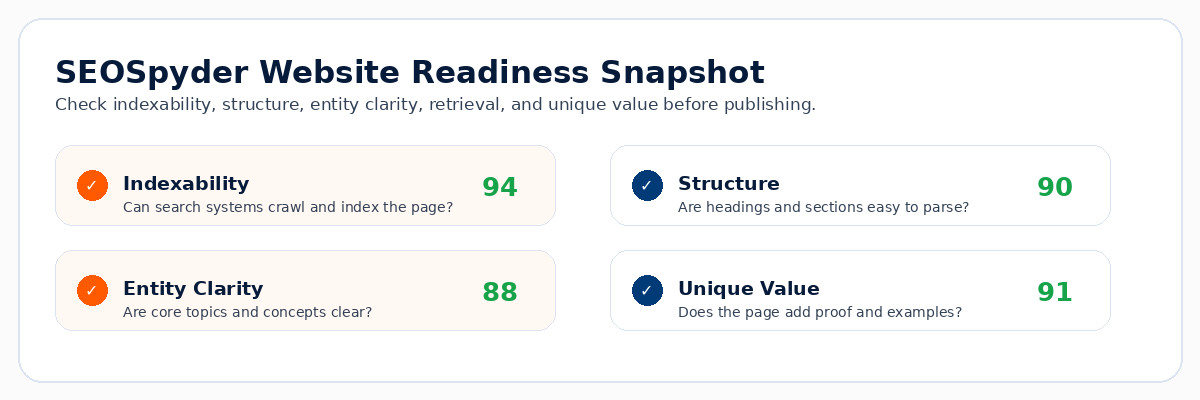
A SEOSpyder AI Search Readiness Snapshot can check indexability, page structure, entity clarity, semantic coverage, internal links, answer quality, and unique value so teams do not rely on guesswork.

Snapshot Area What It Checks Why It Matters
Indexability Can search systems crawl and index the page? Keeps the page eligible for search visibility.
Structure Are headings, sections, summaries, and FAQs clear? Improves extraction and usability.
Entity clarity Are main concepts, features, and related terms clear? Builds stronger topic signals.
Unique value Does the page add proof, examples, or original insight? Creates a reason to cite and click.

Make your website pages easier for search and AI systems to use

Use SEOSpyder to review technical SEO, content quality, internal links, answer clarity, topic coverage, entity signals, and AI-search readiness before your next publishing cycle.

For SEO managers, content leads, founders, and agencies building AI-ready organic growth.

Frequently Asked Questions

What is AI SEO for websites? +

AI SEO for websites is the process of improving website pages so search engines and AI systems can crawl, understand, retrieve, summarize, and cite them more effectively.

Is AI SEO different from regular SEO? +

AI SEO is not separate from regular SEO. It builds on SEO fundamentals while improving answer clarity, retrieval readiness, entity clarity, and citation value.

Which website pages should I optimize first? +

Start with pages that already get impressions, product or service pages, comparison pages, high-intent blog posts, and pages that support conversion decisions.

How do I make a page easier for AI systems to use? +

Use direct answers, clear headings, focused sections, internal links, entity clarity, semantic coverage, FAQs, and unique value such as examples, proof, or expert insights.

Do I need special AI markup for AI SEO? +

No special AI-only markup guarantees visibility. Structured data can support SEO where relevant, but it does not replace useful content, technical access, and clear page structure.

How can SEOSpyder help with AI SEO for websites? +

SEOSpyder can help teams review indexability, structure, internal links, answer clarity, entity signals, semantic coverage, content quality, and AI-search readiness before publishing or refreshing pages.


AI SEO Strategy: A 90-Day Plan for Brands That Need More Than Blog Traffic

AI SEO stretegy


SEOSpyder Guide · AI SEO & AI Search

Quick Answer

An AI SEO strategy is a structured plan to improve how a brand appears across classic search, AI Overviews, AI Mode, answer engines, and retrieval-led discovery. In 2026, a strong AI SEO strategy should not chase blog traffic only. It should improve technical eligibility, topic authority, answer clarity, brand consistency, internal linking, retrieval readiness, and unique value that gives users a reason to click.

Most SEO strategies fail in 2026 because they still treat traffic as the only goal. Traffic matters, but AI-led search has changed the path users take before they visit a website. A brand may appear in an AI answer, be compared in a follow-up prompt, get cited from a third-party page, or lose visibility because its own content does not explain the topic clearly enough.

That is why AI SEO strategy needs a wider plan. It should combine AI search optimization, content quality, technical SEO, internal linking, and brand authority into one practical workflow.

This matters more after Google’s March 2026 update cycle reinforced broad quality evaluation and Google’s May 2026 AI-search guidance reaffirmed that SEO still underpins generative search visibility.

Use this 90-day AI SEO strategy to move beyond publishing random blogs and build a system for search visibility, retrieval, citation, trust, and qualified growth.


Why Most AI SEO Strategies Fail in 2026

Many AI SEO strategies fail because they are only content calendars with a new label. Teams publish more articles, add AI keywords, and wait for traffic. That approach misses how AI-led discovery works.

A useful AI SEO strategy needs to answer bigger questions: Can Google crawl and index the content? Is the page structured for extraction? Does the brand have consistent topic signals? Does the page add something AI cannot easily summarize? Are important pages connected through internal links?

Strategy rule

If your AI SEO strategy only measures blog sessions, it is too narrow. Measure visibility, citations, indexed pages, assisted conversions, topic coverage, and branded demand too.


Core AI SEO Strategy Framework

A strong AI SEO strategy has five pillars. Each pillar supports both traditional organic search and AI-led visibility.

Pillar What It Means Why It Matters
Technical eligibility Pages must be crawlable, indexable, fast, and internally discoverable. AI visibility still starts with search eligibility.
Topic authority Build clusters around buyer problems, entities, and decision journeys. Strengthens topical understanding and trust.
Answer structure Use direct answers, clear sections, tables, FAQs, and step workflows. Makes content easier to retrieve and summarize.
Unique value Add examples, data, expert notes, templates, and product-specific insight. Gives users a reason to click beyond an AI summary.
Brand consistency Keep messaging consistent across pages, profiles, and third-party mentions. Reduces confusion when AI systems summarize your brand.

90-Day AI SEO Strategy Plan

Use this 90-day plan to build momentum without trying to fix everything at once.

1

Days 1–15: Audit search eligibility and current visibility

Review crawlability, indexability, technical issues, key landing pages, ranking drops, branded queries, internal links, and pages with high impressions but weak clicks. Connect this with your AI SEO checklist.

2

Days 16–30: Map prompts, journeys, and topic gaps

Do not optimize for every AI prompt. Identify the questions that matter to buyers: problem discovery, tool comparison, pricing concerns, alternatives, implementation, and decision confidence.

3

Days 31–55: Upgrade priority pages for retrieval

Refresh existing pages before creating too many new ones. Add direct answers, better headings, comparison sections, internal links, FAQs, examples, and original proof. This is where non-commodity content becomes essential.

4

Days 56–75: Build authority around commercial topics

Create supporting pages around decision-stage topics, competitor comparisons, use cases, industry examples, and implementation questions. Link them to core product and category pages.

5

Days 76–90: Measure, refine, and scale

Track ranking movement, AI visibility patterns, branded search growth, assisted conversions, high-impression pages, and pages earning meaningful clicks. Then turn the winning process into a monthly workflow.


Real Example: From Blog Traffic to Revenue-Led AI SEO

A weak strategy might publish ten informational blogs each month and report traffic growth. A stronger AI SEO strategy starts by asking which content helps users choose, trust, compare, and act.

Example workflow

A SaaS brand can map buyer prompts, refresh product-adjacent pages, build comparison content, strengthen internal links, and use AI-readiness checks before publishing. This creates visibility across awareness, evaluation, and decision journeys instead of only top-of-funnel blog traffic.


Where SEOSpyder Fits in the AI SEO Strategy Workflow

The practical use case for SEOSpyder is to help teams review important pages before publishing or refreshing them. Instead of guessing whether a page is AI-ready, teams can check the areas that affect classic search, AI Overviews, and AI Mode.

SEOSpyder Snapshot Area What It Helps Review Strategy Value
Technical readiness Indexability, internal links, structure, and accessibility. Prevents strategy from failing at the foundation.
Answer clarity Direct answers, focused sections, and FAQ readiness. Improves extraction and user experience.
Unique value Examples, proof, expert insight, and useful depth. Creates a reason to cite and click.
Cluster strength Supporting guides, internal links, and topic relationships. Builds authority beyond one blog page.

Build an AI SEO strategy that goes beyond blog traffic

Use SEOSpyder to review technical SEO, content quality, internal links, answer clarity, topic coverage, and AI-search readiness before your next publishing cycle.

For SEO managers, content leads, founders, and agencies building AI-ready organic growth.

Frequently Asked Questions
What is an AI SEO strategy? +

An AI SEO strategy is a plan for improving visibility across classic search, AI Overviews, AI Mode, answer engines, and retrieval-led discovery by combining technical SEO, content quality, structure, and authority.

Is AI SEO different from traditional SEO? +

AI SEO is not separate from traditional SEO. It builds on SEO fundamentals while improving answer clarity, retrieval readiness, citation value, and brand consistency.

What should a 90-day AI SEO plan include? +

It should include a technical audit, prompt and journey mapping, page refreshes, internal linking, topic cluster improvements, authority-building content, and measurement.

Why is blog traffic not enough for AI SEO? +

Blog traffic alone does not show whether your brand is trusted, cited, visible in AI-led journeys, or helping users move toward a decision.

How do I measure AI SEO strategy success? +

Measure indexed pages, rankings, impressions, clicks, branded demand, assisted conversions, topic coverage, page refresh performance, and visibility across AI-led answers where possible.

How can SEOSpyder help with AI SEO strategy? +

SEOSpyder can help teams review technical SEO, content quality, internal links, answer clarity, topic coverage, and AI-search readiness before publishing or refreshing important pages.


“`

Entity SEO 2026 | How to Build Clear Topic Signals for Search and AI Systems

Entity SEO
SEOSpyder Guide · AI SEO & AI Search

Quick Answer

Entity SEO is the process of making the people, brands, products, concepts, locations, tools, and topics on a page easy for search engines and AI systems to understand. Instead of relying only on keywords, entity SEO clarifies what the page is about, how the main topic connects to related concepts, and why the page is a trustworthy source.

Entity SEO matters because search is no longer only about matching words. Search systems increasingly need to understand things, relationships, context, and credibility. A page that names the right entities, explains their attributes, and connects them naturally can become easier to rank, retrieve, summarize, and cite.

For AI-led visibility, entity SEO connects closely with semantic SEO and AI search optimization. The goal is not to add random related terms. The goal is to create clear topic signals that help humans, search engines, and AI systems understand the page better.

This became more important after Google’s March 2026 update cycle reinforced broad quality evaluation and Google’s May 2026 AI-search guidance reaffirmed that SEO still underpins generative search visibility.

This guide explains what entity SEO means, why it matters in 2026, how it differs from keyword-only optimization, where teams go wrong, and how SEOSpyder’s AI Search Readiness Snapshot can help teams review entity clarity before publishing.


What Is Entity SEO?

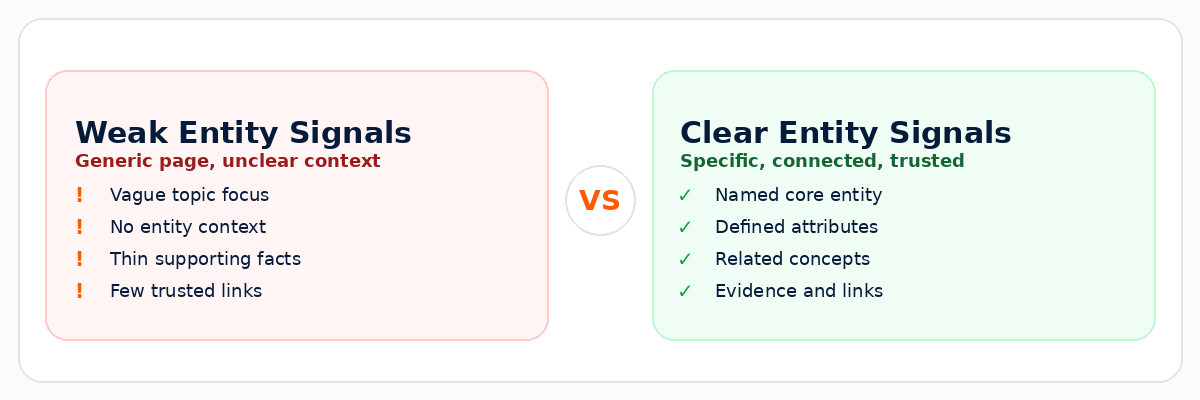
Entity SEO is an approach to search optimization that focuses on clearly identifying the important “things” in your content. These things can include a brand, product, person, software category, process, location, organization, feature, concept, or topic.

A keyword is a phrase users type. An entity is the real concept behind the phrase. For example, “AI search optimization” is a keyword phrase, but the broader entity includes search systems, AI Overviews, AI Mode, generative answers, source citations, content quality, and retrieval.

Simple definition

Entity SEO helps search and AI systems understand what your page is about, what the main topic means, and how it connects to related concepts.

Why Entity SEO Matters in 2026

Google’s AI-search guidance makes it clear that SEO fundamentals still matter for AI Overviews and AI Mode. That means entity SEO should not be treated as a shortcut. It should support helpful content, strong structure, technical accessibility, and trust.

Entity SEO matters because AI-led search experiences need context. A page with clear entity signals can make it easier for systems to understand what the page covers, which related concepts matter, and whether the content is reliable enough to surface as a source.

1

Clarity

Defines what the page is mainly about.

2

Context

Connects related concepts and subtopics.

3

Trust

Supports claims with proof and relevance.

Important note

Entity SEO does not mean adding a list of related words. It means explaining the main topic, its attributes, and its relationships in a way users and search systems can understand.


A Practical Entity SEO Framework

Use this framework when planning new content or improving existing pages. It keeps entity optimization practical instead of theoretical.

Layer What to Clarify Why It Helps
Core entity The main thing, concept, product, or category the page covers. Improves topic clarity.
Attributes Important properties, features, definitions, facts, and examples. Helps systems understand what makes the entity specific.
Relationships Related entities, subtopics, tools, categories, and use cases. Builds stronger topical context.
Evidence Proof, expert notes, sources, internal links, and real examples. Improves trust and citation readiness.


Step-by-Step Entity SEO Workflow

Use this workflow when creating a new SEO page or improving a page that feels too generic.

1

Define the core entity clearly

Start by identifying the main entity of the page. Define it in simple language early so users and search systems know exactly what the page covers.

2

Add attributes and supporting facts

Explain features, definitions, examples, categories, benefits, limitations, and practical use cases. This helps the page move beyond a shallow keyword definition.

3

Connect related concepts naturally

Build relationships between related topics such as answer engine optimization, generative engine optimization, and AI-led search.

4

Support claims with proof and internal context

Use examples, expert notes, source-backed explanations, and helpful internal links. This aligns with non-commodity content, where original value matters more than generic summaries.

5

Review entity readiness before publishing

Before publishing, check whether the page has entity clarity, strong attributes, related concepts, original examples, internal links, and technical readiness. An AI SEO agent workflow can help standardize this review.


Common Entity SEO Mistakes

Mistake 1: Adding related words without context

Entity SEO is not a checklist of terms. Related concepts need to be explained naturally and connected to the user’s intent.

Mistake 2: Creating vague pages with no clear main entity

If a page tries to cover everything, it may not clearly signal what it is mainly about. Define the primary entity early.

Mistake 3: Ignoring internal linking

Internal links help search systems understand relationships between entities, topics, and supporting pages.

Mistake 4: Publishing commodity content

Generic explanations do not build strong entity signals. Add examples, use cases, proof, and expert review.


SEOSpyder AI Search Readiness Snapshot Use Case

The practical use case for SEOSpyder is to help teams review whether a page sends clear entity and topic signals before publishing.

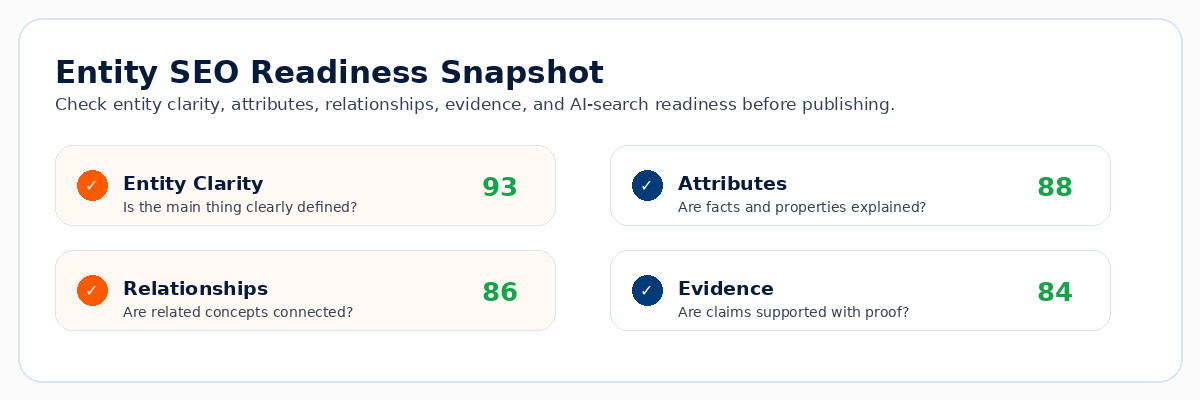
A SEOSpyder AI Search Readiness Snapshot can help check entity clarity, attributes, relationships, evidence, internal links, original value, and AI-search readiness so your pages are stronger for classic search and AI-led discovery.

Snapshot Area What It Checks Why It Matters
Entity clarity Is the main topic clearly named and defined? Improves understanding and relevance.
Attributes Are facts, examples, and properties explained? Adds specificity and depth.
Relationships Are related concepts connected naturally? Builds topical context.
Evidence Are claims supported with proof and examples? Improves trust and citation value.

Build clearer topic signals for search and AI systems

Use SEOSpyder to review entity clarity, content quality, technical SEO, internal links, answer clarity, and AI-search readiness before your next publishing cycle.

For SEO managers, content leads, founders, and agencies building AI-ready organic growth.

Frequently Asked Questions

What is entity SEO? +

Entity SEO is the process of helping search engines and AI systems understand the main people, brands, concepts, products, or topics covered on a page.

Is entity SEO different from semantic SEO? +

They overlap. Semantic SEO focuses on meaning and topic coverage, while entity SEO focuses more specifically on the things, attributes, and relationships that make meaning clear.

Does entity SEO mean I should ignore keywords? +

No. Keywords still reveal demand and user language. Entity SEO adds clarity about the concepts behind those keywords.

How do I improve entity SEO on a page? +

Define the core entity early, add attributes and examples, connect related concepts, support claims with proof, and use internal links to related resources.

How does entity SEO help AI search visibility? +

Entity SEO improves clarity, context, relationships, and trust, making pages easier for AI-led search systems to understand, retrieve, summarize, and cite.

How can SEOSpyder help with entity SEO? +

SEOSpyder can help teams review entity clarity, attributes, relationships, internal links, original value, technical readiness, and AI-search readiness before publishing.


“`

:::

Semantic SEO in 2026 | How Topic Coverage Beats Exact-Match Obsession

Semantic SEO
SEOSpyder Guide · AI SEO & AI Search

Quick Answer

Semantic SEO means optimizing content around meaning, search intent, entities, topic relationships, and complete answers instead of only exact-match keywords. A strong semantic SEO page answers the main query fast, covers related subtopics, connects useful internal pages, and adds original value that users, search engines, and AI-led search systems can understand.


What Is Semantic SEO?

Semantic SEO is the practice of building content around the complete meaning of a topic. Instead of targeting one exact keyword repeatedly, you cover the main intent, related questions, entities, subtopics, examples, comparisons, and next steps that help users understand the subject properly.

Simple definition

Semantic SEO helps your page rank by covering the meaning of a topic, not just the exact words in a keyword.

Real example

A weak page about “semantic SEO” only defines the term. A strong page explains search intent, topic clusters, entity relationships, internal links, content depth, AI search visibility, mistakes, checklists, and how to apply the concept in real SEO workflows.


Semantic SEO vs Exact-Match Keyword SEO

Keywords still matter because they show demand and intent. But keywords are only the starting point. Semantic SEO turns keyword demand into complete, useful, connected content.

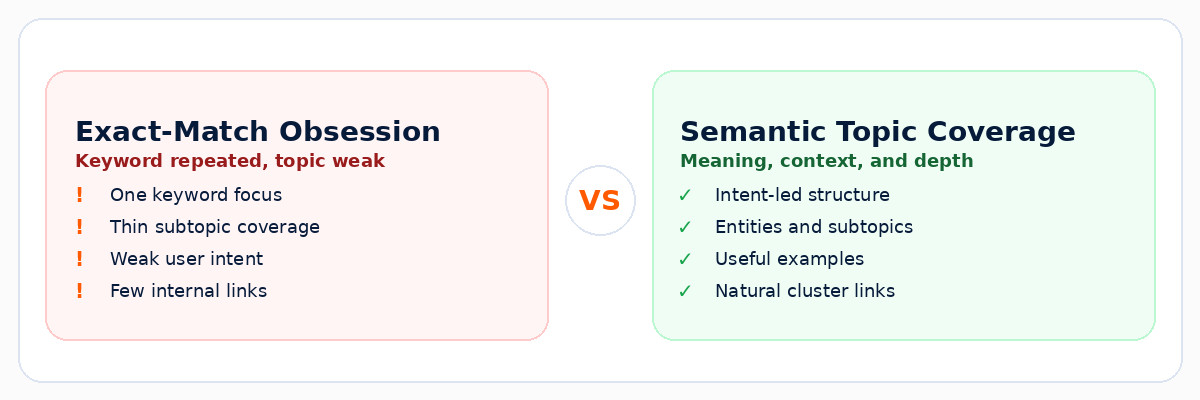
Old Exact-Match Approach Better Semantic SEO Approach
Repeats the target keyword many times. Answers the main query and related user questions naturally.
Creates separate thin pages for close keyword variations. Combines related intent into one stronger resource when it helps the user.
Focuses only on ranking for one phrase. Builds topical authority across entities, subtopics, use cases, examples, and internal links.
Often produces generic content. Adds examples, workflows, expert notes, original value, and decision support.

Semantic SEO comparison showing exact match keywords versus topic coverage, search intent, entities, and AI visibility

Why Semantic SEO Matters in 2026

Search is more intent-led and answer-led. Google Search, AI Overviews, AI Mode, and answer engines need pages that explain topics clearly, not pages that only repeat a phrase.

1

Intent depth

Covers what users actually want to know, compare, fix, or decide.

2

Topic coverage

Explains related entities, subtopics, examples, comparisons, and questions.

3

AI readiness

Makes pages easier to understand, retrieve, summarize, and cite.

Important note

Semantic SEO does not mean ignoring keywords. Keywords still guide demand and intent. The mistake is treating one exact phrase as the entire topic.


A Practical Semantic SEO Framework

Use this framework before creating a new SEO page or refreshing an existing one.

Layer What to Cover Helpful Example
Primary intent The direct answer to the user’s main query. “What is semantic SEO?” answered clearly near the top.
Related entities Concepts, tools, systems, and terms linked to the topic. Search intent, entities, topic clusters, internal links, AI Overviews.
Subtopics Questions, comparisons, examples, workflows, and mistakes. Semantic SEO vs keyword SEO, checklist, workflow, mistakes, FAQs.
Internal context Links to related cluster pages and supporting guides. Connect to entity SEO, LLM SEO, and AI content optimization.

Step-by-Step Semantic SEO Workflow

Use this workflow when planning a new page or upgrading existing content for better topic coverage.

1

Start with the real search intent

Ask what the user wants to understand, compare, fix, or decide. Semantic SEO starts with the user need, not a list of repeated phrases.

2

Map entities and subtopics

List connected terms, examples, questions, tools, workflows, and concepts users expect. For AI-led visibility, this connects naturally with AI Search SEO.

3

Build answers in layers

Start with a direct answer. Then add definitions, examples, frameworks, comparison tables, FAQs, and practical steps. This improves user experience and SEO for AI Overviews.

4

Add original value

Avoid generic summaries. Add product insights, expert notes, screenshots, examples, mini checklists, decision frameworks, or real workflow details. This is what makes content more useful than a basic AI answer.

5

Review before publishing

Before publishing, check topic coverage, answer clarity, internal links, originality, mobile readability, and technical readiness. This prevents thin or AI-generic content from going live.


Semantic SEO Checklist

Use this checklist before you publish or refresh an important page.

Check What Good Looks Like
Main query answered early The user gets a clear answer in the first section.
Related subtopics covered The page answers follow-up questions users are likely to ask.
Entities are clear Important concepts, tools, features, and related terms are explained naturally.
Internal links support context The page links to relevant cluster pages, not random posts.
Original value added Examples, workflows, tables, checklists, expert notes, or product-specific insight are included.

Common Semantic SEO Mistakes

Mistake 1: Treating semantic SEO as keyword stuffing 2.0

Adding more related terms is not enough. The page must explain the topic better and help the user make progress.

Mistake 2: Creating thin pages for every variation

Do not create separate weak pages for every close keyword. Combine related intent into one stronger resource when it serves the user better.

Mistake 3: Ignoring internal links

Semantic SEO depends on context. Internal links help users and search systems understand how your content cluster fits together.

Mistake 4: Publishing generic AI summaries

AI can help with structure and research, but final content still needs expert review, real examples, originality, and clear usefulness.


SEOSpyder AI Search Readiness Snapshot Use Case

The practical use case for SEOSpyder is to help teams check whether a page covers a topic deeply enough for classic SEO and AI-led search visibility.

Snapshot Area What It Checks Why It Matters
Intent alignment Does the page solve the main user need? Improves relevance and usefulness.
Topic coverage Are related subtopics and entities covered? Supports semantic relevance.
Answer clarity Can users and search systems understand the page quickly? Supports better extraction and user experience.
Original value Does the page add insight beyond generic summaries? Prevents commodity content.

Build topic coverage that performs beyond exact-match keywords

Use SEOSpyder to review content quality, topic coverage, technical SEO, internal links, answer clarity, and AI-search readiness before your next publishing cycle.

For SEO managers, content leads, founders, and agencies building AI-ready organic growth.

Frequently Asked Questions
What is semantic SEO? +

Semantic SEO is the practice of optimizing content around meaning, search intent, entities, topic relationships, and full topic coverage rather than only exact-match keywords.

Is semantic SEO different from traditional SEO? +

Semantic SEO builds on traditional SEO. Keywords, crawlability, metadata, and internal links still matter, but semantic SEO adds stronger intent coverage, topical depth, and related context.

Does semantic SEO mean I should ignore keywords? +

No. Keywords still help identify demand and search intent. Semantic SEO simply prevents teams from treating one exact-match keyword as the full topic.

How do I improve semantic SEO on an existing page? +

Review the page for missing subtopics, unclear headings, weak examples, internal link gaps, thin sections, related questions, and places where the page does not fully satisfy user intent.

How does semantic SEO help AI search visibility? +

Semantic SEO improves answer clarity, context, entities, and topic relationships, making pages easier to understand, retrieve, summarize, and cite in AI-led search experiences.

How can SEOSpyder help with semantic SEO? +

SEOSpyder can help teams review topic coverage, answer clarity, internal links, original value, technical readiness, and AI-search readiness before publishing or refreshing pages.

LLM SEO 2026 | How to Structure Content for Search, Retrieval, and Citation

LLM SEO

SEOSpyder Guide · AI SEO & AI Search

Quick Answer

LLM SEO means structuring your content so search engines, AI search systems, and large language models can find it, understand it, retrieve the right passages, and cite it as a useful source. It is not a replacement for SEO. The best LLM SEO strategy combines classic SEO fundamentals with answer-first structure, clear headings, source-backed claims, internal links, FAQs, and original value that makes the page worth citing.

LLM SEO matters because users are no longer discovering content only through traditional rankings. They now interact with AI Overviews, AI Mode, answer engines, chat-based search, and retrieval-based AI tools that summarize information from different sources.

A strong LLM SEO workflow starts with AI content optimization, because pages need to be clear, useful, technically accessible, and structured before they can perform well in AI-led discovery.

This became more important after Google’s March 2026 update cycle reinforced broad quality evaluation and Google’s May 2026 AI-search guidance reaffirmed that SEO still underpins generative search visibility.

This guide explains what LLM SEO means, what Google actually says, how to structure pages for retrieval and citation, where teams go wrong, and how SEOSpyder’s AI Search Readiness Snapshot can help teams prepare pages before publishing.


What Is LLM SEO?

LLM SEO is the practice of improving content so large language models and AI search systems can retrieve, understand, summarize, and cite it accurately. It focuses on how your content is structured at the section, paragraph, and passage level.

Classic SEO helps search engines crawl, index, and rank pages. LLM SEO adds another layer: it makes your content easier to extract and reference in answer-led experiences. That is why it overlaps with generative engine optimization, answer engine optimization, and AI search optimization.

Simple definition

LLM SEO helps your page become easier to search, retrieve, summarize, and cite by using clear structure, answer-first writing, strong evidence, and helpful internal context.

Why LLM SEO Matters After 2026 Search Updates

Google’s AI-search guidance makes one thing clear: optimizing for generative AI features is still part of SEO because AI Overviews and AI Mode rely on Google’s Search ranking and quality systems. That means technical SEO, helpful content, structure, and quality signals still matter.

But AI-led search changes how pages are used. Instead of showing only a ranked URL, AI systems may retrieve specific passages, compare multiple sources, and cite pages that answer part of a user’s question. So your page needs to be strong at both the page level and the passage level.

1

Search

Can the page be crawled, indexed, and understood?

2

Retrieval

Can specific sections answer specific questions?

3

Citation

Does the page provide trustworthy, source-worthy value?

Important note

LLM SEO is not about writing for bots. It is about making your useful content easier for humans, search engines, and AI systems to understand.


A Practical LLM SEO Structure Framework

The best LLM SEO structure is simple: answer clearly, support the answer, organize related questions, and make the page easy to cite. Use this framework before publishing or refreshing important pages.

Layer What to Improve Why It Helps
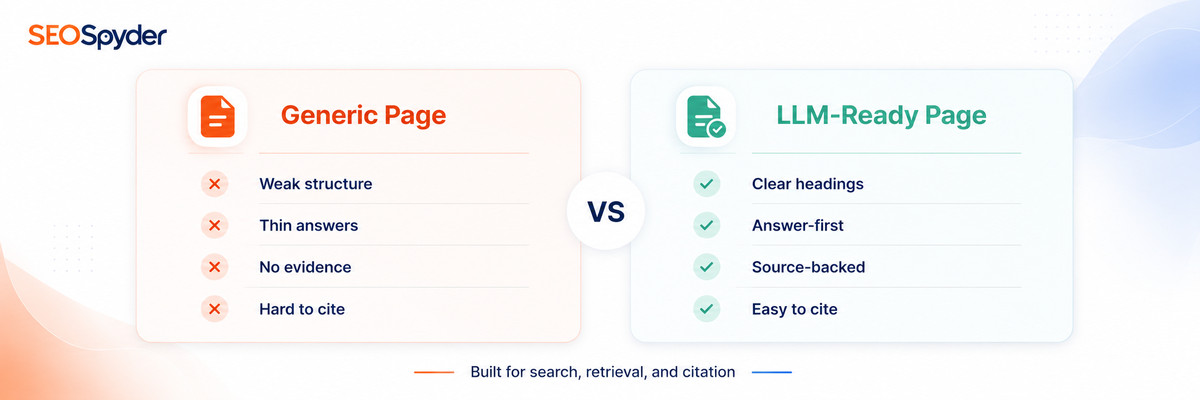
Answer-first sections Start important sections with a direct answer. Makes passages easier to retrieve and summarize.
Heading hierarchy Use clear H2 and H3 sections for subtopics. Helps search and AI systems understand relationships.
Evidence and examples Add source-backed claims, examples, data, and use cases. Improves trust and citation value.
Internal context Link related guides naturally across the article. Improves topical relationships and user navigation.


Step-by-Step LLM SEO Workflow

Use this workflow when creating new content or upgrading existing pages for AI search visibility.

1

Map the query and sub-questions

Start with the main query, then identify follow-up questions, related definitions, comparison needs, and practical steps users expect. This connects naturally with AI search optimization.

2

Structure the page for retrieval

Use clear H2s and H3s, keep sections focused, and make each section answer a specific user need. Retrieval works better when content is organized into clear, useful passages.

3

Add original value and proof

A page that only repeats generic definitions is easy to summarize but not always worth citing. Add examples, frameworks, expert notes, use cases, and original insights. Use non-commodity content as your quality benchmark.

4

Improve internal links and topical context

Connect the page to related resources such as answer engine optimization, generative engine optimization, and AI SEO workflows.

5

Run an AI-search readiness review

Before publishing, review answer clarity, structure, evidence, internal links, technical readiness, and citation value. This is where an AI SEO agent workflow can help standardize checks.


Common LLM SEO Mistakes

Mistake 1: Writing only generic definitions

Definitions are useful, but they are not enough. Add practical examples, decision frameworks, use cases, and expert commentary.

Mistake 2: Ignoring passage-level clarity

LLM SEO depends on clear sections. If a paragraph tries to answer too many things at once, it becomes harder to retrieve and cite.

Mistake 3: Treating LLM SEO as a hack

LLM SEO is not about manipulating AI systems. It is about making useful content easier to understand, verify, and reference.

Mistake 4: Forgetting classic SEO foundations

A page still needs crawlability, indexability, performance, internal links, helpful content, and clear search intent alignment.


SEOSpyder AI Search Readiness Snapshot Use Case

The practical use case for SEOSpyder is to help teams review whether a page is structured for search, retrieval, and citation before publishing.

A SEOSpyder AI Search Readiness Snapshot can help check answer clarity, structure quality, original value, internal links, technical readiness, and citation value so teams can improve the page before it goes live.

Snapshot Area What It Checks Why It Matters
Answer clarity Does each section answer a specific question? Improves retrieval and readability.
Structure quality Are headings, tables, FAQs, and summaries clear? Helps search and AI systems understand the page.
Original value Does the page add examples, proof, or expert insight? Prevents commodity content.
Citation value Would the page be a useful source for an answer? Supports AI-search visibility and trust.

Structure your content for search, retrieval, and citation

Use SEOSpyder to review content quality, technical SEO, internal links, answer clarity, and AI-search readiness before your next publishing cycle.

For SEO managers, content leads, founders, and agencies building AI-ready organic growth.

Frequently Asked Questions

What is LLM SEO? +

LLM SEO is the practice of structuring content so large language models and AI search systems can find, understand, retrieve, summarize, and cite it accurately.

Is LLM SEO different from traditional SEO? +

LLM SEO is not a replacement for traditional SEO. It builds on SEO fundamentals by improving answer clarity, passage structure, retrieval readiness, and citation value.

How do I structure content for LLM SEO? +

Use clear H2s and H3s, answer-first paragraphs, focused sections, FAQs, comparison tables, source-backed claims, and helpful internal links.

Does schema guarantee LLM citations? +

No. Schema can help search engines understand content, but it does not guarantee AI citations. Helpful, clear, trustworthy content still matters most.

How does LLM SEO support AI Overviews? +

LLM SEO improves direct answers, structure, evidence, and internal context, making pages easier to understand and cite in AI-led search experiences.

How can SEOSpyder help with LLM SEO? +

SEOSpyder can help teams review answer clarity, structure quality, original value, internal links, technical readiness, and AI-search readiness before publishing.


“`

:::

AI Content Optimization 2026 | How to Upgrade Existing Pages Without Making Them Generic

Ai Content Optimization

SEOSpyder Guide · AI SEO & AI Search

Quick Answer

AI content optimization means using AI to improve existing pages for search intent, structure, readability, topical coverage, internal links, technical SEO, and AI-search readiness. The goal is not to rewrite pages into generic AI content. The goal is to upgrade what already exists with clearer answers, stronger proof, better examples, fresher context, and a stronger reason for users to stay, trust, and click.

AI content optimization has become one of the most practical SEO workflows for 2026 because many websites already have pages with impressions, rankings, and topical relevance. The problem is that those pages may be outdated, thin, poorly structured, or not ready for AI-led search experiences.

For a stronger foundation, start with this guide on AI SEO optimization. Content optimization should connect to your full SEO system: keyword intent, technical readiness, internal links, answer-first structure, and non-commodity value.

This matters more after Google’s March 2026 update cycle, which reinforced broad quality evaluation, and Google’s May 2026 AI-search guidance, which reaffirmed that SEO fundamentals still support visibility in AI Overviews and AI Mode.

This guide explains what AI content optimization means, where teams go wrong, and how to upgrade existing pages without making them sound like every other AI-generated article on the web.


What Is AI Content Optimization?

AI content optimization is the process of using AI to analyze and improve existing content. It can help identify missing subtopics, weak headings, thin answers, outdated sections, unclear search intent, internal link gaps, FAQ opportunities, and places where a page needs stronger proof.

The best use of AI is not “rewrite this article.” The better prompt is: “Audit this page against search intent, user usefulness, competitor gaps, AI-search readability, and original value.” That keeps the workflow focused on improvement instead of generic output.

Simple definition

AI content optimization helps teams improve existing pages with better answers, structure, evidence, internal links, and AI-search readiness while keeping the final content human-led.

Why AI Content Optimization Matters After Quality Updates

After a core update, many teams rush to publish new content. A smarter first move is to inspect existing pages: which ones lost visibility, which ones gained impressions but low clicks, and which ones rank but do not fully satisfy search intent?

AI can help speed up that review. But it should not decide quality alone. Google’s core update guidance recommends reviewing top pages and queries after a full week and focusing on whether pages are genuinely helpful. That makes AI useful for diagnosis, while human judgment remains essential for final decisions.

1

Refresh value

Improve pages that already have search signals.

2

Avoid sameness

Do not turn updates into generic AI rewrites.

3

AI-search fit

Make pages easier to understand and cite.

Important note

AI content optimization works best when it upgrades a page’s usefulness. If it only adds more words, more keywords, or generic definitions, it can weaken the page instead of improving it.


A Practical AI Content Optimization Framework

Use this framework before refreshing any existing page. It keeps your optimization focused on quality, not just AI-generated expansion.

Optimization Layer What AI Can Help Find Human Quality Check
Search intent Missing questions, mismatched sections, weak answer depth. Does the page solve the real user problem?
Original value Generic sections, repeated competitor points, weak examples. Can we add data, examples, workflows, or experience?
Structure Unclear H2s, long blocks, missing FAQs, poor scanability. Can a reader understand the answer quickly?
AI-search readiness Missing direct answers, weak internal links, unclear proof. Can the page support classic SEO and AI citations?


Step-by-Step AI Content Optimization Workflow

Use this workflow when refreshing an existing blog, landing page, comparison page, or SEO resource.

1

Choose pages with existing search signals

Start with pages that already have impressions, rankings, backlinks, internal links, or business relevance. These are often better candidates than brand-new AI-generated pages.

2

Audit intent, structure, and gaps with AI

Use AI to identify unclear sections, missing questions, weak headings, outdated points, and internal link gaps. This connects naturally with AI search optimization.

3

Add non-commodity value before adding more words

Improve the page with examples, screenshots, original notes, stronger comparisons, workflows, or product-backed insights. Use this guide on non-commodity content for AI search as a quality benchmark.

4

Strengthen answer-first sections and internal links

Rewrite key sections so users get the answer quickly, then add depth. Connect related pages such as answer engine optimization and generative engine optimization where relevant.

5

Publish only after human review

Before updating the page, review accuracy, tone, examples, links, product claims, formatting, and whether the page is genuinely better than the previous version.


Common AI Content Optimization Mistakes

Mistake 1: Rewriting the whole page without a reason

A full rewrite can remove useful existing signals, examples, or wording that already works. Improve sections intentionally instead of replacing everything.

Mistake 2: Adding keywords without improving usefulness

AI can easily add related terms, but keyword expansion does not matter if the page still fails to answer the user’s real question.

Mistake 3: Removing the human voice

AI can make content smoother, but it can also make every page sound the same. Keep expert judgment, brand tone, and specific examples.

Mistake 4: Ignoring technical and internal link issues

A better paragraph cannot fix poor crawlability, weak internal linking, slow mobile experience, or unclear page architecture.


SEOSpyder AI Search Readiness Snapshot Use Case

The practical use case for SEOSpyder is to help teams decide how to improve existing pages before refreshing them. Instead of rewriting blindly, teams can review whether a page has answer clarity, original value, technical readiness, internal links, and AI-search fit.

A SEOSpyder AI Search Readiness Snapshot can help prioritize updates based on what matters most: better user answers, stronger topical coverage, clean structure, and a clear reason to cite or click the page.

Snapshot Area What It Checks Why It Matters
Answer clarity Does the page answer the main query early? Improves user satisfaction and AI-search readability.
Original value Does the updated page add something competitors miss? Prevents generic AI content.
Internal links Is the page connected to related AI SEO resources? Improves topical context and navigation.
Technical readiness Can the page be crawled, indexed, and understood? Keeps the page eligible for Search and AI features.

Upgrade existing pages without making them generic

Use SEOSpyder to review content quality, technical SEO, internal links, answer clarity, and AI-search readiness before your next content refresh.

For SEO managers, content leads, founders, and agencies building AI-ready organic growth.

Frequently Asked Questions

What is AI content optimization? +

AI content optimization is the use of AI to improve existing pages for search intent, structure, readability, topical coverage, internal links, and AI-search readiness.

Is AI content optimization the same as AI rewriting? +

No. AI rewriting changes wording. AI content optimization improves usefulness, search intent match, structure, evidence, internal links, and AI-search readiness.

How do I optimize old content with AI? +

Start with pages that have existing search signals, audit them for gaps, improve answer clarity, add original value, strengthen internal links, and review everything before publishing.

Can AI content optimization hurt rankings? +

It can hurt if the update removes useful content, adds generic sections, weakens accuracy, or changes the page without understanding search intent. Optimization should be intentional and reviewed.

How does AI content optimization support AI search? +

It improves direct answers, structure, evidence, internal links, and topical clarity, making the page easier to understand for AI-led search experiences.

How can SEOSpyder help with AI content optimization? +

SEOSpyder can help teams review answer clarity, original value, technical readiness, internal links, content quality, and AI-search readiness before refreshing important pages.


“`